Mrs. O Around the World · Travel Tips
The travel essential that doesn’t take up any room in your suitcase.
There are the things you pack for a trip, and then there are the things you sort out before you leave. A VPN belongs in the second category.
It may not be the most exciting part of planning a holiday. Neither is checking your passport expiry date, but both deserve a little attention before you get to the airport.
I’ve already written about using NordVPN with an Amazon Fire Stick abroad. But there is more to a VPN than having something familiar to watch in the evening. Here is what it can do when travelling, what it cannot do, and what is worth checking before you subscribe.
The quick version
Do you need a VPN for travel?
A VPN can be a useful extra layer of privacy when you use hotel, airport or café Wi-Fi. It encrypts the connection between your device and the VPN server and changes the IP address websites see. It does not make you anonymous, replace a mobile data plan or guarantee access to every streaming service.
| When travelling | Where a VPN helps | Keep in mind |
|---|---|---|
| Hotel and airport Wi-Fi | Adds privacy for traffic carried through the VPN. | Still check the network name and use HTTPS. |
| Comparing travel prices | Lets you try browsing from another virtual location. | Cheaper prices are not guaranteed. |
| Watching programmes abroad | May help with access to some services. | Location rules, subscriptions and VPN blocks still apply. |
| Travelling with several devices | Can cover your phone, tablet and laptop. | Check device limits and app compatibility. |
What is a VPN, in plain English?
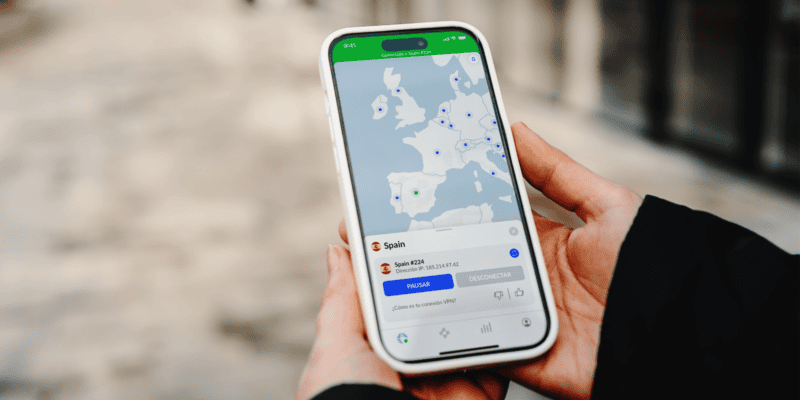
VPN stands for virtual private network. You install an app, choose a server location and connect. Your internet traffic then travels through an encrypted connection to that server before continuing to the websites and services you use.
That gives the local network less visibility into your browsing. Websites generally see the VPN server’s IP address rather than your usual one, although signing into an account still tells that service who you are.
You are also trusting the VPN provider to handle your traffic responsibly. Choosing a reputable service matters more than choosing the cheapest offer on the screen.
Using a VPN on hotel Wi-Fi
A beautiful hotel does not tell you very much about how its Wi-Fi is managed. The same goes for an airport lounge or the lovely little café where you stop for coffee.
Most modern websites already use HTTPS, which encrypts the information exchanged between your browser and the website. Public Wi-Fi is therefore not automatically the security disaster it is sometimes made out to be.
A VPN adds another layer of privacy between your device and the VPN server. It is useful to consider when you regularly move between networks you do not control.
A few habits still matter
- Ask the hotel or café to confirm the exact network name.
- Keep your phone, laptop and browser updated.
- Use strong, unique passwords and turn on two-factor authentication.
- Do not ignore browser security warnings or install software a Wi-Fi pop-up unexpectedly asks you to download.
A VPN cannot make a fake booking website trustworthy or stop you handing your password to a scammer. Think of it as one part of your travel setup.
Can a VPN get you cheaper flights or hotels?
Possibly, but I would treat this as a comparison exercise rather than a money-saving promise.
Changing your virtual location may produce different search results, currencies or offers. It may also produce exactly the same price. Availability, dates, booking conditions and the website you use can all matter more.
If you want to try it, compare the same itinerary or room on the same terms. A fresh private browser window can help separate sessions, but it will not remove every location or account signal.
Check the final total, including currency conversion, baggage, taxes and cancellation conditions. A cheaper headline rate is not particularly useful if the booking turns out to be less flexible.
What about watching programmes abroad?
A quiet evening in a hotel room is sometimes exactly what you want. Particularly after a long journey.
A VPN can change the location your connection appears to come from, but streaming services have their own location rules and may block VPN connections. Access can change, and you still need the relevant subscription and any required licence.
For the Fire Stick setup already covered on the blog, start with the separate guide below.
What to look for in a VPN for travelling abroad
Simple apps
You want to be able to connect without turning your holiday into an IT project. Check that the service supports the devices you actually take.
Suitable server locations
Look for coverage where you need it. A nearby server is usually a sensible starting point when privacy is your main aim.
Clear privacy policies
Read what the provider collects and look for independent audits. A reassuring slogan on its own tells you very little.
Useful connection settings
Look for automatic connection options and a kill switch where supported. A kill switch can block traffic if the VPN disconnects; behaviour varies by device.
Also check the renewal price, cancellation terms and what your chosen plan includes. Extra malware or scam protection is separate from the basic VPN connection and may depend on the plan and operating system.
The option already featured on the blog
NordVPN for travel
NordVPN is the service featured in my existing Fire Stick guide, so it is a natural place to start if you want to use the same setup.
For travel, the useful features include apps for major phone and computer platforms, support for up to 10 simultaneous devices, and 24/7 support. Check compatibility for your particular devices before signing up.
Rather than choosing purely on the advertised monthly equivalent, compare the amount you pay upfront with the renewal cost. Check whether any additional protection features you want are included in that specific plan.
No VPN can fix a poor hotel internet connection or promise that every app will work everywhere. Those are useful expectations to have before you buy.
Set it up before you leave
- Choose your service and plan. Check the devices, renewal terms and features you need.
- Install the official apps at home. Add them to each device you intend to use.
- Sign in and test a connection. Make sure you know how to reconnect and change servers.
- Check the privacy settings. Review automatic connection and kill switch options for each device.
- Keep your travel essentials available offline. Save your booking confirmations and important contact details.
On arrival, you may need to complete the hotel Wi-Fi sign-in page before connecting the VPN. If the connection causes problems, use the provider’s official support guidance.
Make this part of your wider pre-departure routine.
A few questions before you go
Does a VPN give me internet access abroad?
No. You still need Wi-Fi or a mobile data connection. A VPN runs over that connection; an eSIM or roaming plan provides mobile data.
Will a VPN slow down hotel Wi-Fi?
It can. The result depends on your connection, the server and your device. Try a nearby server first. A VPN cannot create bandwidth that the hotel does not have.
Can I use a VPN in every destination?
Do not assume so. Check current official travel advice and local rules before departure, as restrictions and permitted uses differ. A subscription does not guarantee that the service will work at your destination.
Is a free VPN enough for a holiday?
Some reputable providers offer limited free plans, but check their data limits, server choices and privacy policies. Avoid choosing an unfamiliar app simply because it costs nothing.
Does a VPN make online banking completely safe?
No tool offers that guarantee. Use your bank’s official app or website, keep your device updated and enable strong account protection. Banks may also question logins from an unfamiliar VPN location.
A VPN is a useful thing to consider before travelling, particularly if you spend a lot of time on hotel and airport Wi-Fi. Choose one you understand, set it up at home and remember that it works alongside the usual good online habits.
Then you can get back to the more interesting part: planning where to go for dinner.
xo
Mrs. O